Welcome to this process study! code name: Bertinoro
This page will guide you through the onboarding process for the study. Please read all information carefully. Registration takes approximately 10–15 minutes and must be completed in a single session.
Principal Investigator
Serhat Kahyaoglu Yıldız Technical University
Research Tool
The Stone Guest (TSG) stoneguest.translation-cognition.com
🔒
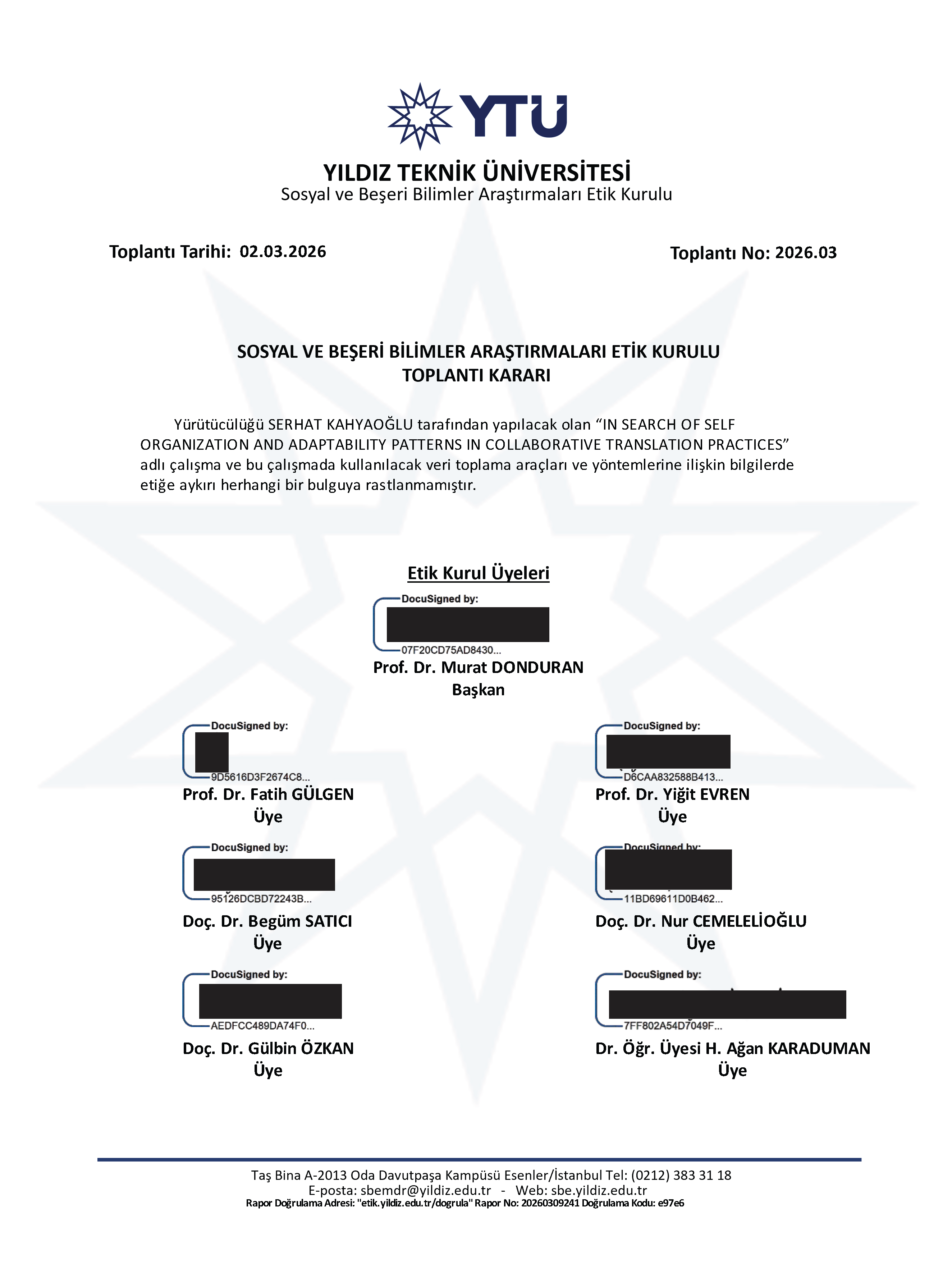
Bu araştırma, T.C. Yıldız Teknik Üniversitesi Sosyal ve Beşeri Bilimler Araştırmaları Etik Kurulu tarafından incelenmiş, araştırma tasarımı ve yönteminde etiğe aykırı herhangi bir unsur saptanmamıştır.
(02.03.2026 tarihli ve 2026/03 sayılı toplantı). Tüm veriler anonimleştirilerek güvenli biçimde saklanmaktadır. Katılımınız tamamen gönüllülük esasına dayanmakta olup istediğiniz zaman çekilebilirsiniz. (Ethics approval from YTU Ethics Committee. All data anonymised. Participation is voluntary.)
You will complete the following steps in order: informed consent and translation brief, background information, generating your unique Participant ID, setting up Zulip, installing The Stone Guest (TSG), watching an orientation video, and completing the LexTALE vocabulary assessment. You will then collaborate with a pre-assigned anonymous group to produce a competitive Wikipedia translation over multiple sessions.
👁You are reviewing this step. Your registration has already been saved.
Step 1 of 8
Informed Consent & Translation Brief
Please read the informed consent form (Turkish) below in full, then review the translation brief. You must scroll to the bottom of the consent form before the checkboxes become active.
Katılımcı Bilgilendirme ve Aydınlatılmış Onam Formu (Turkish)
Bu belge, Serhat Kahyaoğlu tarafından yürütülen bilimsel bir araştırmaya katılımınızla ilgili sizi bilgilendirmek amacıyla hazırlanmıştır. Katılım tamamen gönüllülük esasına dayalıdır ve bu formu okuyup onaylamadan araştırmaya dahil olmanız söz konusu değildir.
Araştırma süreci, katılımcıların doğal çalışma ortamlarında (ev veya ofis) gerçekleştirecekleri çeviri görevleri üzerinden yürütülecektir. Bu süreçte verilerin sağlıklı bir şekilde toplanabilmesi ve iletişimin sürdürülebilmesi adına iki temel dijital araç kullanılacaktır. İlk olarak, araştırma ekibi ve katılımcılar arasındaki tüm (projeyle alakalı) iletişim, dosya paylaşımı ve görev dağılımı Zulip adlı anlık mesajlaşma ve iş birliği platformu üzerinden sağlanacaktır. İkinci ve en temel veri toplama aracı olarak ise, araştırmacı tarafından Python programlama dili kullanılarak özel olarak geliştirilmiş bir Fare ve Klavye Süresi Yazılımı kullanılacaktır.
Araştırma kapsamında size gönderilen yazılım, bilgisayarınıza zarar verecek, sistem dosyalarınızı bozacak veya arka planda gizlice çalışacak herhangi bir kötü amaçlı kod içermemektedir. Önemle belirtmek gerekir ki, bu yazılım çevrimiçi bir veri aktarımı yapmamaktadır. Verilerin araştırmacıya iletilmesi işlemi tamamen sizin kontrolünüzdedir; siz ilgili dosyayı e-posta yoluyla araştırmacıya göndermediğiniz sürece, hiçbir veri bilgisayarınızdan dışarı çıkmayacaktır.
Araştırma sırasında elde edilen tüm veriler, bilimsel etik kuralları çerçevesinde gizli tutulacaktır. Toplanan verilerde isminiz veya kimliğinizi doğrudan açığa çıkaracak bilgiler kullanılmayacak; bunun yerine her katılımcıya özel bir kod (Örn: Katılımcı 01, Oturum 05) atanarak veriler anonimleştirilecektir. Yazılımın açık olduğu ve kayıt yaptığı süre boyunca, çeviri metni haricinde kişisel yazışmalarınızı yapmamanız, bankacılık şifreleri veya kimlik numaraları gibi hassas verileri girmemeniz önemle rica olunur. Elde edilen bulgular akademik çalışmalarda kullanılacak olup veriler üçüncü şahıslarla kesinlikle paylaşılmayacaktır.
Bu çalışmaya katılım tamamen sizin hür iradenize bağlıdır. Çalışmaya katılmayı reddedebilir veya katıldıktan sonra herhangi bir aşamada, hiçbir gerekçe göstermeksizin araştırmadan çekilebilirsiniz. Çekilme kararınızı araştırmacıya bildirmeniz durumunda, o ana kadar sizden toplanmış olan tüm veriler (log dosyaları, çeviri metinleri vb.) derhal imha edilecek ve araştırma sonuçlarına dahil edilmeyecektir. Bu durum, akademik veya profesyonel hayatınızda size herhangi bir sorumluluk veya olumsuzluk yüklemeyecektir.
Yukarıda amacı ve içeriği belirtilen bu araştırma ile ilgili bilgiler tarafıma aktarıldı. Bu bilgilerden sonra araştırmaya katılımcı olarak davet edildim. Bu çalışmaya katılmayı kabul ettiğim takdirde gerek araştırma yürütülürken gerekse yayımlandığında kimliğimin gizli tutulacağı konusunda güvence aldım. Bana ait verilerin kullanımına izin veriyorum. Araştırma sonuçlarının eğitim ve bilimsel amaçlarla kullanımı sırasında kişisel bilgilerimin dikkatle korunacağı konusunda bana yeterli güven verildi.
Araştırmanın yürütülmesi sırasında herhangi bir sebep göstermeden çekilebilirim. Araştırma için yapılacak harcamalarla ilgili herhangi bir parasal sorumluluk altına girmiyorum. Bana herhangi bir ödeme yapılamayacaktır. Araştırma ile ilgili bana yapılan tüm açıklamaları ayrıntılarıyla anlamış bulunmaktayım. Bu çalışmaya hiçbir baskı altında kalmadan kendi bireysel onayım ile katılıyorum.
↓ Formu sonuna kadar okuyun / Scroll to the bottom to activate the checkboxes
Translation Brief - !PLEASE READ IT CAREFULLY!
We have observed that the Turkish Wikipedia entry for Çeviri (Translation) is not as comprehensive as the English source. To address this, you will be working in pre-assigned groups to translate the English Wikipedia entry into Turkish. This is a competitive task: the group producing the best translation will have their work officially published on Wikipedia.
This teamwork will be strictly anonymous. You will not know the identities of your teammates, and all interaction must occur exclusively within the provided Zulip communication platform. The use of external channels — such as WhatsApp, SMS, email, or any other messaging tool — is strictly prohibited.
Our aim is to demonstrate your ability to collaborate with unfamiliar co-workers, reflecting the reality that professional translation teams do not always consist of personal acquaintances.
As part of our process research, please ensure that The Stone Guest (TSG) is active whenever you are engaged in the translation task, and closed at all other times. After the project is complete, we will analyze how the translation was produced.
This is a six-week collaborative translation project running from April 6 to May 18, 2026; teams are expected to plan their work accordingly, with the final translated text due by the end of Week 6. Early submissions will not be accepted.
🖨️Bu formu kaydetmek veya yazdırmak için tarayıcınızın yazdır işlevini kullanabilirsiniz (Ctrl+P / Cmd+P). Use Ctrl+P / Cmd+P to save or print a copy for your records.
👁You are reviewing this step. Your registration has already been saved. Changes here will not update the server record — contact the researcher if a correction is needed.
Step 2 of 8
Participant Information
Please provide your background information. All fields marked with * are required. Use English characters.
Please fill in all required fields before continuing.
The language(s) you translate from and into
All completed degrees — field and institution
Current program and institution, or 'None' if not currently enrolled
The Stone Guest (TSG) must be installed on this machine before the task
Please use an address you check regularly. Check your spam folder if you do not receive the credentials within 24 hours.
👁You are reviewing this step. Your registration has already been saved. Your Participant ID is locked — do not alter these fields.
Step 3 of 8
Generate Your Participant ID
Your Participant ID is a 5-character code derived from personal details that only you know. Fill in each field below and your ID will be generated automatically. Follow the instructions carefully for each field. Turkish characters are automatically converted to their Latin equivalents (ç→C, ğ→G, ı/İ→I, ö→O, ş→S, ü→U).
2nd letter of your last name
e.g., last name "Kahyaoglu" → 2nd letter is a
—
Pos. 1
Your birth day
Zero-pad single-digit days — e.g., day 3 → 03 → digit 3 | day 21 → 21 → digit 1
—
Pos. 2
Your town of residence
e.g., "Çatalca" → Ç is converted to C, 2nd letter a, 4th letter a → contributes aa⚠ Town name needs at least 4 letters.
—
Pos. 3–4
2nd letter of your grandmother's first name (maternal or paternal)
e.g., "Fatma" → 2nd letter a | "Emine" → 2nd letter m
—
Pos. 5
Your Participant ID
_ _ _ _ _
Complete all fields above to generate your ID
📌Note this ID carefully. You will enter it into The Stone Guest (TSG) each time you begin a translation session, and you will use it when uploading your data files at
upload.translation-cognition.com. Write it down or screenshot this page before continuing. Also, we'll send you an e-mail to register the code.
⚠️Do not close or refresh this browser tab until you have completed all registration steps. All your progress is held in memory and will be lost if the page is reloaded.
👁You are reviewing this step. Your registration has already been saved.
Step 4 of 8
Communication Platform: Zulip
Zulip is a topic-based team messaging platform. It is the sole space where your group will coordinate, discuss the source text, and share drafts. Think of it as a structured, threaded team chat — each conversation is organised into channels and topics so nothing gets lost. You do not need any prior Zulip experience; the orientation video in the next step will walk you through it.
How to access Zulip
🌐
Web Browser
No install required. Open the workspace URL in any browser.
Recommended for the scope of this study
🖥️
Desktop App
Windows, macOS & Linux. Notifications and offline message cache included.
⚠️Mobile apps are for coordination between sessions only. The Stone Guest (TSG) runs exclusively on desktop computers. Your actual translation work — anything TSG must record — must take place in Zulip on your desktop or laptop with TSG active. Use your phone or tablet only to read messages, reply to teammates, or follow discussions when you are away from your computer.
📂 What your Zulip workspace looks like
#Your group channel — a private channel shared only with your anonymous teammates and the researcher. All translation work and discussion takes place here.
✍️Translation topic — your group works on the Turkish target text collaboratively within this thread. All edits and discussions are logged.
📣Announcements — the researcher will post any study updates, deadlines, or corrections here. Check this channel regularly.
🤐Anonymity — your account name is a pseudonym. You will not see your teammates' real names, and they will not see yours. This is intentional.
📧 Credentials Will Be Sent to Your Email
Your Zulip login details — workspace URL, username, and temporary password — will be sent to the address below before the project begins. Please check your inbox and your spam/junk folder if you do not receive them.
Credentials will be sent to
—
Do not begin the translation task until you have received your credentials and successfully logged in. If you have not received them within 24 hours of your scheduled start, contact serhat.kahyaoglu@yahoo.com.
🔐
You will be assigned a dedicated account — do not share your credentials with anyone, do not create additional accounts, and do not modify the channel structure. Log in only on devices you control.
🚫No external communication. All group interaction must occur exclusively within Zulip — no WhatsApp, SMS, email, phone calls, or any other platform. Violation will invalidate your group's contribution to the study.
🗓️
The project spans multiple sessions. Log in to Zulip whenever you are ready to work. You can check messages and reply on mobile between sessions, but always activate TSG on your desktop before doing any translation work.
👁You are reviewing this step. Your registration has already been saved.
Step 5 of 8
Install The Stone Guest (TSG)
The Stone Guest (TSG) is the keystroke logging tool used in this study. You must download and install it on the same computer you will use for the translation task. TSG records keystroke timing and editing events only — no screen content, clipboard data, or text is captured.
⬇ Download TSG
Visit the link below to download The Stone Guest for your operating system. Follow the installation instructions on the download page, then return here to continue.
🍎macOS users: After installation, you must grant TSG Accessibility permission. Go to System Settings → Privacy & Security → Accessibility and enable Terminal. Without this permission TSG cannot record activity.
📌
When you launch TSG, enter your Participant ID when prompted. Activate TSG only when you are actively working on the translation task — open it at the start of each work session and close it when you stop. Do not leave TSG running while doing unrelated work. Upload your TSG data file when the project is complete.
👁You are reviewing this step. Your registration has already been saved.
Step 6 of 8
Orientation Video
Please watch the following video in full. It introduces the Zulip environment you will be working in during your translation session. The Continue button will become available once the video has ended.
▶Video ready — press play to begin
👁You are reviewing this step. Your registration has already been saved.
Step 7 of 8
Vocabulary Assessment LexTALE — English
📋 Test Instructions
This test consists of about 60 trials, in each of which you will see a string of letters. Your task is to decide whether this is an existing English word or not. If you think it is an existing English word, you click on "yes" and if you think it is not an existing English word, you click on "no".
If you are sure that the word exists, even though you don't know its exact meaning, you may still respond "yes". But if you are not sure if it is an existing word, you should respond "no".
In this experiment, we use British English rather than American English spelling. For example: "realise" instead of "realize"; "colour" instead of "color", and so on. Please don't let this confuse you. This test is not about detecting such subtle spelling differences anyway.
You have as much time as you like for each decision. This part of the experiment will take about 5 minutes.
⌨️You can also use your keyboard: press Y or → for YES, and N or ← for NO. The first 3 items are practice and will not count towards your score. Once you give your first response you cannot go back.
📋Practice item — the first 3 items are for practice only and will not be scored.
—
Item 1 of 63
Your LexTALE Score
—
English vocabulary proficiency (0–100%)
✅Vocabulary assessment complete. Your registration is being saved — wait for the confirmation above, then click Finish Registration.
Registration Complete
You're all set.
Thank you for completing registration. Your Participant ID and background information have been recorded on the server. In addition, you should have recieved an e-mail, noting your participant ID. Please check your spam folder and also please read the steps below carefully before closing this page.
Your Participant ID
—
Keep this — you will need it throughout the study
1
Check your email for your Participant ID and Zulip credentials.
An e-mail on your Participant ID has just been sent. Also, Zulip credentials will be sent to you by the researcher before the project starts. Do not begin until you have received them. Check your spam folder if they do not arrive promptly.
2
Each time you begin a work session: launch TSG, enter your Participant ID when prompted, then log in to Zulip and start working. TSG must be active only while you are engaged in the translation task.
3
Collaborate with your group exclusively within Zulip. All communication must remain on the platform — no WhatsApp, SMS, or any other channel. You will not know who your teammates are; this is intentional.
4
When you stop working for the day, close TSG. Upload your data and repeat the same procedure whenever you engage in a translation activity.
5
At the end of each session, upload your TSG data file at
upload.translation-cognition.com
using your Participant ID. TSG creates the file automatically in the logs folder where you run the script.
✅You may now safely close this browser tab. Your data has been saved. Use the button above to print or save a PDF copy of this page for your records. An e-mail has also been sent.
✉️Questions or technical issues? Contact me at serhat.kahyaoglu@yahoo.com.
YTÜ Sosyal ve Beşeri Bilimler Araştırmaları Etik Kurulu Onay Belgesi / YTU Ethics Committee of Social Sciences and Humanities Approval Doc.